You do the work.
We take the call.
An AI receptionist for service businesses that run on phone calls. Catch overflow and after-hours calls, capture what customers need, and give your team a clear next step.
takes the first hello.
“Thanks for calling Cedar Services. I’m the AI assistant. How can I help?”
You’re busy.
Your next customer still needs an answer.
Your receptionist takes the call and captures the request, so your team can follow up with context.
On the job.
Still there for the caller.
As an Owner/Operator in the home service industry your time is constantly being pulled between your hand on the ‘hammer’ or on the phone. Fox Trove AI Receptionist has been a great addition to our team. When we miss a call or are unavailable it is able to field calls and win business that we would otherwise be missing out on.
Evergreen Radon & Construction Services

“I deal with a lot of answering services, virtual assistance, and AI receptionists. Yours has been the easiest to use and functions better than any of the other others I’ve encountered. Was very natural, helpful, and understood what I needed.”
Keep your team in the conversation.
Start with backup coverage, or let the AI take the first hello.
Your team rings first. AI provides backup when unanswered.
Forwarding, fallback, and transfers are set up and tested with your carrier. Availability depends on your plan and configuration.
Try a real conversation
Hear the call.
See the work.
Choose a fictional business and try busy or after-hours coverage alongside its receptionist. Real voice calls, simulated CRM and calendar. Use sample details only.
Fictional business
Clear Ridge Radon
Radon testing · Mitigation estimate · System inspection
Monday–Friday, 8 AM–5 PM
Sample service area: Fort Collins, Loveland, Windsor
“I’m Alex Demo in Loveland. Can I move my system inspection to Thursday?”
Choose how to call when demo setup is ready.
Explore the sample records
Customer: Alex Demo. Existing appointment: System inspection, Tuesday, 10 AM. Sample lead: Mitigation estimate. Openings: Wednesday, 9 AM; Thursday, 2 PM. All times are illustrative Mountain Time.
Clear Ridge Radon
Live conversation
Your conversation starts here.
Choose a business and start a call. Spoken replies and real tool activity appear together in this private stream.
No scripted transcript. Only your call.Action summary 0 completed
What the agent does
Simulated integrationsActions appear only when the voice agent requests a tool and our demo returns a result. The conversation determines which steps run.
Customer lookup
WaitingNo tool request yet.
Service-area check
WaitingNo tool request yet.
Availability lookup
WaitingNo tool request yet.
CRM lead creation
WaitingNo tool request yet.
Booking
WaitingNo tool request yet.
Rescheduling
WaitingNo tool request yet.
Follow-up preparation
WaitingNo tool request yet.
No customer systems are connected. No real appointments are booked or follow-up messages sent.
The call ends.
The context stays.
See who called and what they needed. Review summaries, update your business information, and adjust your receptionist from your dashboard.
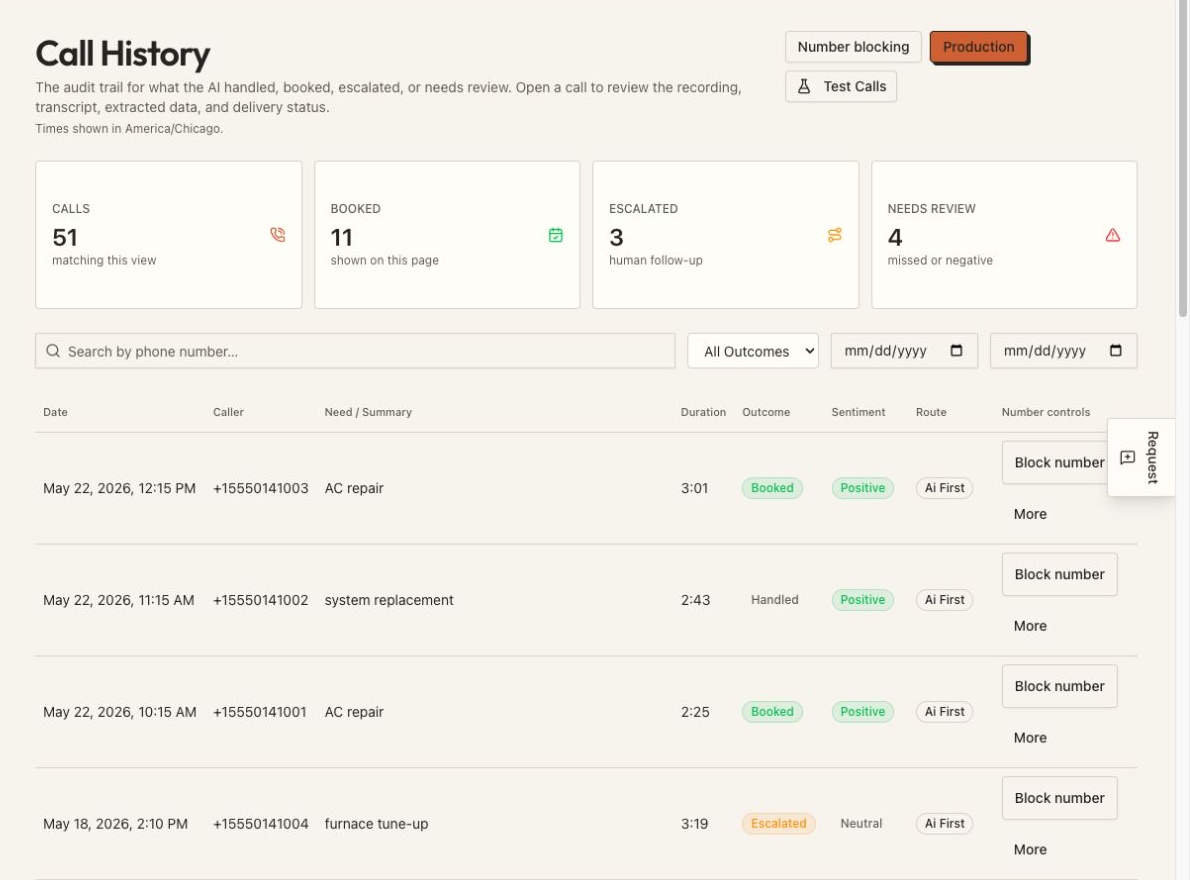
Filter history and see which calls were handled, booked, or escalated.
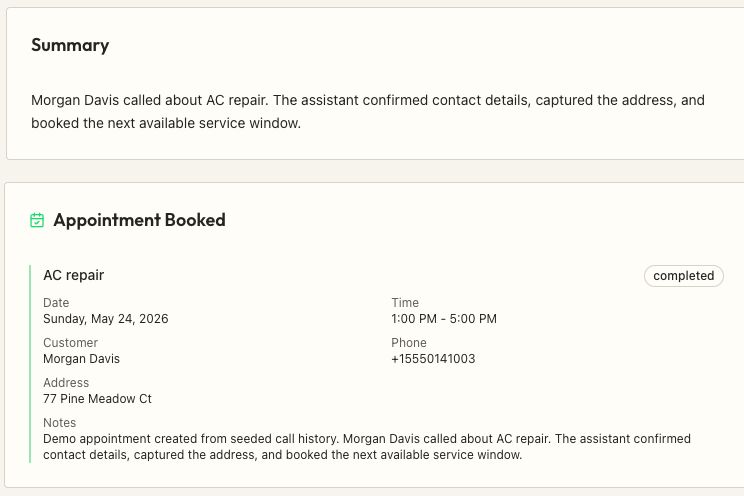
Read the request and review linked appointment details where booking is connected.
Actual dashboard screens from a test account. Names, contact details, and call activity are fictional sample data. Select an image to view it larger.
If your next customer calls,
we can help you answer.
For service businesses that depend on inquiries, estimates, appointments, and callbacks.
- Home servicesRoofing · HVAC · Plumbing · Electrical · Radon
- Cleaning & restorationCleaning inquiries & restoration requests
- Landscaping & lawn careNew estimates & recurring service
- Pest controlTreatment inquiries & service visits
- Auto repair & detailingService questions & appointment requests
- Salons & personal careBookings & questions between clients
- Property servicesTenant inquiries & maintenance requests
- Professional servicesNew client inquiries & consultations
Connects to the tools
you already use.
Connect supported CRMs, calendars, and other systems. Available actions depend on the provider and your plan. Connect them in your dashboard, and ask us if you need help.
CRM & Field Service
Jobber
ServiceTitan
Housecall Pro
HubSpot
Salesforce
Scheduling
Google Calendar
Calendly
Accounting & Payments
QuickBooks
Xero
Stripe
Communication & Marketing
Slack
Google Business
CompanyCam
Set it up yourself.
Or let us help.
Choose a plan and get your account going online. Use the setup tools yourself, or have FoxTrove help you get your receptionist ready.
You’re in control.
Add your business details, choose how calls are handled, and manage your receptionist from the dashboard.
Choose a planWe can work through it with you.
Your setup fee includes 30 days of hands-on support. We can help with your business information, call flow, testing, and refinements.
Talk through your setupAdd your business
Enter your services, hours, and answers to common questions. You can scan your website to help fill in the details, then review and edit them.
Choose how calls work
Set your greeting and call handling. Connect a supported calendar or CRM if you want to use it.
Test, then connect your calls
Make a test call, check the responses, and set up forwarding or porting for your business number. Keep adjusting things in your dashboard.
The setup fee applies to either path. Phone setup and connected features depend on your carrier, plan, and tools.
Want ongoing hands-on help?
After the first 30 days, you can keep managing your receptionist yourself or add Priority Optimization for $149/month for continued hands-on refinement and support. Custom workflows are scoped separately.
A clear starting point.
Set it up yourself or use the included 30 days of hands-on support. Your one-time setup is $299.
Starter
For lighter call volume.
Billed monthly
375 included minutes / month
About 75 calls at five minutes each.
Additional time: $0.35/minute
- One AI receptionist
- Lead capture
- Booking with a supported calendar
- Email notifications
- Basic analytics
- Number porting available: $147
Growth
For a busier team.
Billed monthly
1,000 included minutes / month
About 200 calls at five minutes each.
Additional time: $0.30/minute
- Everything in Starter
- Smart call routing
- Knowledge base
- Supported CRM connections
- Caller intelligence and verification
- Advanced analytics
- Priority email support
- Number porting available: $97
Scale
For higher call volume.
Billed monthly
2,000 included minutes / month
About 400 calls at five minutes each.
Additional time: $0.25/minute
- Everything in Growth
- Three AI receptionists
- SMS follow-ups
- Review generation and webchat
- After-hours emergency dispatch
- AI-assisted optimization review
- Number porting included
- Dedicated account manager and priority phone support
Before you change your call flow.
Can I keep my business number?
Yes. We can set up forwarding from your existing number or help with porting. You can also connect your own Twilio account where supported. Timing depends on your carrier and setup.
Can my team still answer calls?
Yes. Human-first routing gives your team the first chance to answer, with AI backup for unanswered calls. AI-first routing lets the receptionist answer up front. Routing and transfers depend on your plan, carrier, and configuration.
Will callers know it’s AI?
The receptionist introduces itself as an AI assistant. It answers using the business information you approve and the tools you connect.
What happens when it doesn’t know an answer?
Set how the receptionist should capture a request or pass it to your team. You can test those situations with your business information before directing customer calls to the receptionist.
Can I set this up myself?
Yes. Sign up online, add your business details, choose your call handling, and manage your receptionist in the dashboard. Make a test call and finish your phone setup before directing customer calls to it. Help is available if you want it.
What does the setup fee include?
Your one-time launch fee includes setup and 30 days of hands-on support. We shape your business information and call flow, run inbound tests, review call outcomes, and refine approved responses with you.
What happens after the first 30 days?
Your receptionist keeps running on your chosen plan. Manage it yourself through the dashboard, or add optional Priority Optimization for $149/month for continued hands-on refinement and support.
Can you build custom workflows?
We can discuss routing rules, bilingual handling, and connections to your existing systems. Supported actions and any additional development are scoped with you before agreement.
How long does setup take?
Timing depends on your business requirements, connected tools, carrier forwarding or porting, and test results. You can work through setup yourself or with our help. Test your receptionist before forwarding customer calls.
What if I use more than my included minutes?
Additional AI call time is billed at $0.35/minute on Starter, $0.30/minute on Growth, and $0.25/minute on Scale. Usage limits apply; review your allowance and usage in the dashboard.
How does caller verification work?
Caller verification can be configured before sharing sensitive details. Available checks depend on your connected tools and access rules. We work through the policy and test it as part of setup.
Estimate potential missed-call revenue.
Hypothetical gross revenue opportunity, not profit or guaranteed recovery. Assumes missed callers could become leads and close at your entered rate.
Ready for your
next call?
Choose a plan, add your business, and set up your calls. We’re here if you want a hand.
Get my AI receptionistWant to explore it first? Request a demo